
Microsoft Fabric: is it right for your business?
I run Microsoft Fabric in production. I’m currently platform lead on a Fabric migration for a 250+ employee national telecoms business, and I hold the Microsoft DP-600 Fabric Analytics Engineer Associate certification. This page covers what I’d tell you on a call before you buy Microsoft Fabric services from anyone: what Fabric is, when it fits, what it costs, and what I’ve learned delivering it.
What Microsoft Fabric is
Fabric is Microsoft’s software-as-a-service analytics platform. It brings data ingestion, engineering, warehousing, real-time analytics and Power BI into one environment, billed through a single capacity. All of it sits on OneLake, a shared storage layer that holds data in the open Delta format. Inside it you create lakehouses, warehouses, pipelines, notebooks and semantic models. If you already use Power BI, you’re closer to Fabric than you might think: the Power BI service is now part of it.
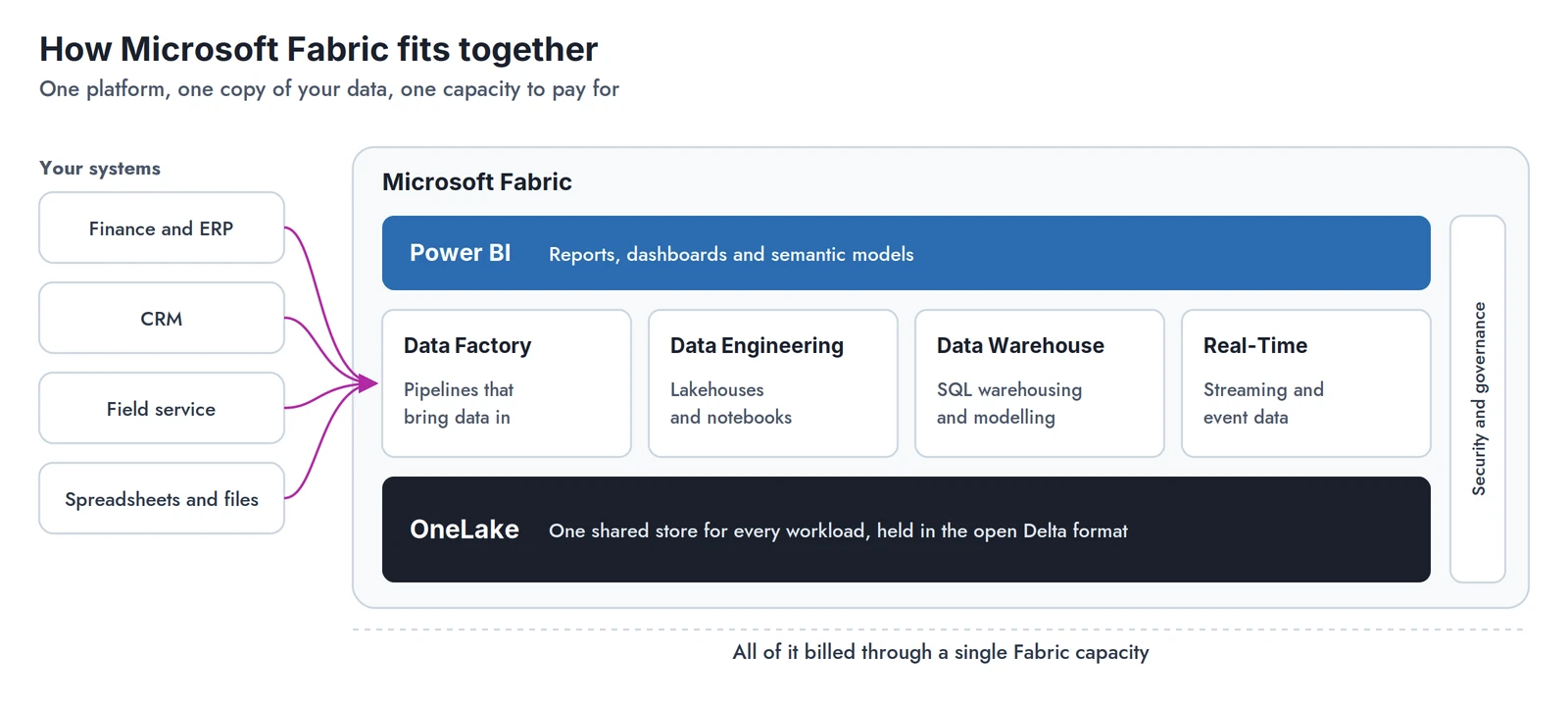
Why Microsoft Fabric? When it fits, and when it doesn’t
Fabric tends to fit well when:
- You already use Power BI and want to go beyond viewing reports: combining sources, exploring the data and building your own models in the same place.
- You’re moving off on-premises SQL Server, SSIS or SSRS. Fabric has a home for each: pipelines for the loads, a warehouse or lakehouse for the data, and paginated reports for the SSRS estate.
- You want one system rather than several, with storage, engineering, reporting and security managed together instead of stitching separate Azure services.
- You’d rather pay one predictable capacity charge than meter each service separately, and your workload runs steadily enough to use what you pay for.
- Several systems need joining before reporting can be trusted.
It’s a weaker fit when:
- A few data sources and a set of core reports are the whole requirement. Azure Data Factory, Azure SQL and Power BI Pro will often do the same job for less.
- Your data work doesn’t need Python or PySpark notebooks. If pipelines and SQL cover it, much of what Fabric adds goes unused.
- Usage is light or occasional. Capacity bills while it runs, whether or not anyone is using it, and someone has to own it.
- You need a settled platform. Fabric changes every month: features move out of preview, names change and behaviour shifts. That’s manageable with someone keeping track, but it’s a real overhead for a small team.
The honest question is rarely “is Fabric good?” It’s whether your team can maintain what gets built.
Fabric in practice: what I’ve delivered
Enterprise migration, national telecoms business. I’m platform lead and Fabric administrator. I designed a medallion lakehouse bringing four core source systems together, with GitHub-based CI/CD across Dev, Test and Production and a service-principal security model. I’m leading the move of more than 40 customer-facing reports from on-premises SSRS to Fabric paginated reports, and the shutdown of the on-premises data warehouse once everything has moved.
Fabric implementation for Cloud Formations. Metadata-driven ingestion pipelines, Silver-layer mapping and Gold dimensional model notebooks, and a Direct Lake semantic model with Power BI reporting.

Lessons from running Fabric in production
When should a Fabric notebook use Python rather than PySpark?
Plain Python notebooks start in seconds on small compute, which suits API calls and landing files. PySpark clusters take longer to start but handle heavy Delta transformations far better. Splitting the two, and setting a standard for which is used where, removed a recurring deployment failure on the platform I run.
Can you handle peak load without buying a bigger capacity?
Often, yes. If demand peaks at a predictable time, such as a monthly report run, a pipeline can scale the capacity through the Azure Management API around that window and back down afterwards. That’s usually cheaper than paying for the peak all month.
What does CI/CD look like in Fabric?
Workspaces connected to Git through GitHub or Azure DevOps, separate Dev, Test and Production environments, and automated promotion of artefacts between them. It works well once it’s set up. The traps are in the detail: environment variables that are case-sensitive, notebooks that bind to the wrong lakehouse after deployment, and shortcuts that can break silently. Budget time for those.
How Fabric compares
| Platform | Where it’s strong | What you add alongside it |
|---|---|---|
| Snowflake | SQL warehousing, cross-cloud | Ingestion, orchestration and a BI tool |
| Databricks | Heavy engineering and machine learning | Databricks is building out its own BI and dashboards, but most teams still pair it with Power BI or similar |
| Google BigQuery | Serverless SQL on Google Cloud | Orchestration, often dbt, and a BI tool |
| Azure Data Factory, Azure SQL + Power BI | Simple, lower-cost reporting | Room to grow as sources multiply |
Fabric’s advantage is having those pieces in one place. Its trade-off is that you’re committing to the Microsoft stack.
What Fabric costs
You buy capacity in F SKUs, sized by compute. The smallest, F2, lists at around £226 a month on pay-as-you-go, or around £134 a month on a one-year reservation. That’s before storage, and before Power BI licences: below F64, anyone viewing Power BI reports needs a Power BI Pro licence. For a smaller organisation that is a real fixed cost, so it’s worth comparing against Azure SQL and Power BI Pro before committing. On pay-as-you-go you can pause capacity when it isn’t needed. Microsoft publishes current Fabric pricing.

Microsoft Fabric services: how I can help
If you’re a business deciding whether Fabric is right, or ready to build on it, start with Data Platform Build. If you’re running a Fabric programme and need senior delivery capacity, see Specialist Delivery.